![Mixergy Logotype Reversed White-3.png]](https://support.mixergy.co.uk/hs-fs/hubfs/Mixergy%20Logotype%20Reversed%20White-3.png?height=40&name=Mixergy%20Logotype%20Reversed%20White-3.png)
Removing yourself from your Mixergy tank
If you're moving out, please remove yourself from your Mixergy tank before you go. This disconnects your account so the next person can set the tank up in their own name.
To do this, open the Mixergy app, go to Remove Tank in the main menu and tap Remove.
Removing the previous user when they haven't done it
If you are the not user of the tank, and the user hasn't removed themselves from the tank, then we recommend you use the Gauge on the side of the tank.
Follow these steps:
- Press and hold the Boost Down and Power buttons simultaneously.
- Continue holding for approximately 15 seconds until the cylinder resets.
- This will disassociate the existing account, allowing you to register a new one in the Mixergy App.
Gauge Terminology
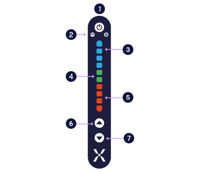 ON/OFF: Hold down to turn the tank on or off. When turned off using the Gauge, your tank will remain connected. It is not recommended to turn off the tank at the mains.
 - Wi-Fi Connection: This is blue when connected.
- Blue lights indicate the volume of cold water in the tank.
- Green lights indicate the target volume the tank is boosting to. As the water heats up, these will gradually turn red.
- Red indicates the volume of hot water in the tank.
- Up Arrow: Press to boost the tank in 10% increments
- Down Arrow: Press to decrease boost in 10% increments
For detailed instructions on registering your cylinder, refer to the Mixergy App guide.
Need more help?
If you are unable to either transfer ownership or gain ownership, please call our Homeowners & Residents line on 01865 884 343 (Option 3).
Opening Hours: Monday to Friday, 09:00 – 17:00.