
You can use hot water as soon as you need it. You do not need to wait for your Mixergy tank to learn your routine.
If you are new to Mixergy, start with our welcome guide. It explains how your tank works, what the lights on the Mixergy Gauge (the slim black control on the front of your tank) mean and how to ask it to heat more water.
Welcome to your Mixergy hot water tank
How the first 14 days work
Your Mixergy tank can learn when your household normally uses hot water. This helps it prepare hot water for the times you are likely to need it, while avoiding heating more water than necessary.
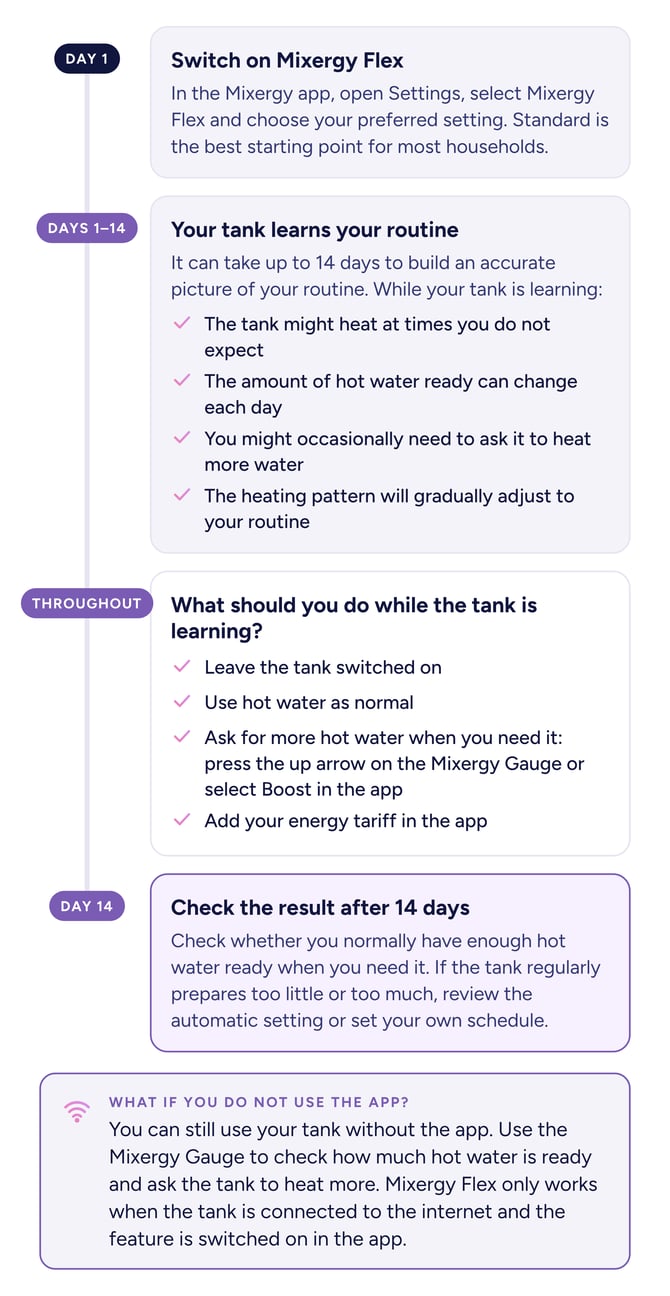
The learning period begins when Mixergy Flex is switched on. This is a setting in the Mixergy app that uses your household’s normal hot water use to adjust when the tank heats.
It can take up to 14 days to build an accurate picture of your routine. The tank will continue making small adjustments if your routine changes later.
Switch on Mixergy Flex
In the Mixergy app:
- Open Settings.
- Select Mixergy Flex.
- Choose your preferred setting.
Standard is the best starting point for most households.
For instructions on how to set up the Mixergy use our getting started guide.
What should you expect during the first 14 days?
While your tank is learning:
- The tank might heat at times you do not expect.
- The amount of hot water ready can change each day.
- You might occasionally need to ask it to heat more water.
- The heating pattern will gradually adjust to your routine.
This is normal. Leave the tank switched on and use hot water as you usually would. You do not need to change your routine to help it learn.
What if you do not use the app?
You can still use your tank without the app. Use the Mixergy Gauge to check how much hot water is ready and ask the tank to heat more.
Mixergy Flex only works when the tank is connected to the internet and the feature is switched on in the app.
Learn how to use the Mixergy Gauge
What should you do while the tank is learning?
1. Leave the tank switched on
The tank needs to stay switched on so it can heat water, follow its schedule and learn your routine. Do not switch it off after using a shower, bath or hot tap.
2. Use hot water as normal
Keep following your household’s usual routine. You do not need to use more or less hot water to help the tank learn.
3. Ask for more hot water when you need it
You do not need to wait for the learning period to finish if you are running low on hot water.
You can ask the tank to heat more water by:
- Pressing the up arrow on the Mixergy Gauge.
- Or selecting Boost in the Mixergy app.
Using Boost occasionally during the learning period is normal.
Learn how to check and boost your hot water
4. Add your energy tariff in the app
Your tariff tells the tank when your energy costs less. If you have cheaper electricity at certain times, adding the correct tariff helps the tank make better use of those periods.
If you do not know your tariff, check a recent energy bill or ask the person who manages the energy account.
5. Check the result after 14 days
After the learning period, check whether you normally have enough hot water ready when you need it.
If the tank regularly prepares too little or too much, review the automatic setting or set your own schedule. If your landlord or housing provider manages the settings, contact them before making changes.
Manage schedules and smart control
Why might the tank heat at an unexpected time?
An unexpected heating time does not always mean there is a problem. The tank might be:
- Learning your household’s routine.
- Using a cheaper period on your energy tariff.
- Using spare energy from compatible solar panels.
- Completing an automatic cleansing cycle to help keep the stored water safe.
During a cleansing cycle, the tank can heat to 100%, even if you did not ask for a full tank. This is normal and you do not need to stop the cycle.
When should you ask for help?
Ask for help if:
- You regularly run out of hot water after the 14-day learning period.
- The tank does not heat when you use Boost.
- The gauge has no lights after you press and hold its power button.
- The app repeatedly shows an error or warning.
- You can see a leak, smell burning or have another safety concern.
Do not remove the controller cover, alter the wiring or change the pipework.
If you rent your home, contact your landlord or housing provider first. If you own your home, follow the relevant troubleshooting guide or contact your installer.
Common questions
Do I need to change the settings every day?
No. Leave the tank switched on and use hot water normally. Mixergy Flex will adjust the heating pattern as it learns.
What should I do if I need more hot water?
Press the up arrow on the Mixergy Gauge or select Boost in the app. This tells the tank to heat more water.
Will using Boost stop the tank learning?
No. Occasional use of Boost is normal. Try not to make repeated changes to the schedule during the learning period.
Why does the amount of hot water change each day?
The tank is still learning how much hot water your household uses. The amount ready can vary while it adjusts the schedule.
Why has the tank heated to 100%?
It is likely to be completing its automatic cleansing cycle. This helps keep the stored water safe.
Still need help? Ask Mixio, our support chatbot, for quick answers to common questions. If you still need help, contact your landlord or housing provider if you rent, or your original installer if you own your home.