![Mixergy Logotype Reversed White-3.png]](https://support.mixergy.co.uk/hs-fs/hubfs/Mixergy%20Logotype%20Reversed%20White-3.png?height=40&name=Mixergy%20Logotype%20Reversed%20White-3.png)
If you enter energy tariff information in the app, the tank may adjust heating times to reduce energy costs. This means heating may happen earlier or later than expected if:
-
Off-peak periods are available
-
Cheaper rates occur overnight
-
Solar generation is expected
How to Set Your Energy Tariff
You can set your tariff through Mixergy Flex in the top left menu or using clicking on 'Set tariff' button under the Insights tab.
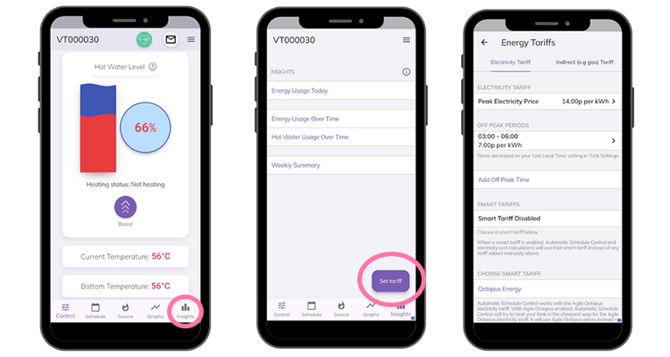
Electricity Tariff
- Peak Electricity Price: Cost per kWh in pence.
- Off Peak Periods: Time of off peak and price in pence per kWh
- Add Off Peak Time: Start time, end time and price in pence per kWh. Multiple off-peak times can be set.
- Smart Tariffs: This will be enabled when a smart tariff has been set.
- Choose Smart Tariff: If you are using Octopus Agile, simply select this from the drop-down list and the area you live.
Indirect (e.g. gas) Tariff:
- Indirect Source: Indirect source either gas or oil
- Gas/Heating Oil Price: Pence per kWh
- Tank Volume: in Litres
- Boiler Efficiency: %
If a smart tariff isn't provided, the cost estimations are based on typical UK electricity and gas tariffs.