![Mixergy Logotype Reversed White-3.png]](https://support.mixergy.co.uk/hs-fs/hubfs/Mixergy%20Logotype%20Reversed%20White-3.png?height=40&name=Mixergy%20Logotype%20Reversed%20White-3.png)
The Mixergy App gives you the option of choosing the automated Mixergy Flex or a manual schedule. Only one of these control methods is active at a time. Understanding which mode you are using is important, as it explains why the tank may or may not follow your schedules.
-
Mixergy Flex: Your tank learns your routine and heats water at the most efficient times based on your usage and energy tariff.
-
Manual schedule: Create a manual schedule that tells your tank exactly when and how much to heat.
-
Holiday schedule: Holiday Mode stops your cylinder from heating while you’re away, temporarily ignoring any existing schedules until your return.
Mixergy Flex
When using Mixergy Flex, your tank learns your routine and and creates an automated schedule. This heats water at the most efficient times based on your usage and energy tariff ensuring comfort, efficiency and economy. We recommend this mode for the best balance of convenience and savings.
In addition to this, Mixergy Flex does something more: when your cylinder shifts its heating to help the electricity network, that flexibility is worth money, and homes that qualify can get a share of the money. Find out more about Mixergy Flex Rewards on our website.
How to set and manage an Mixergy Flex
When you first add a tank, you will have the option to turn on Mixergy Flex and your tank will begin to build an automated schedule based on your routine over the next two weeks.
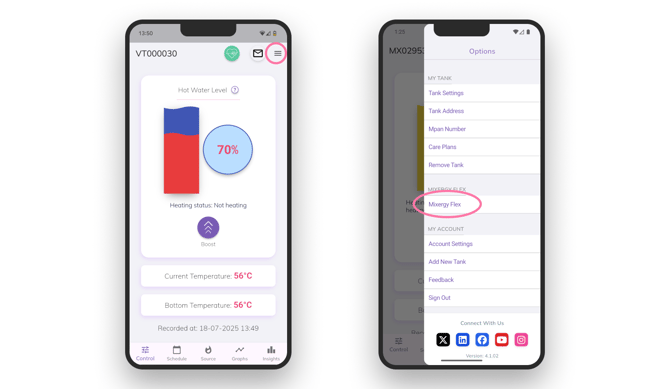
If you want to change your Mixergy Flex settings or switch to manual, you can do so at any time. Simply follow the steps below to find the settings within the App:
-
Navigate to ‘Mixergy Flex’ using the top right menu (see image above).
-
Select from the following options:
-
Standard: The best all-round option. Saves energy while keeping enough hot water for everyday use.
-
Economy: Focuses on maximum savings. this setting is an economy mode which will only heat the minimal amount of hot water, if you think you will use more then we suggest using the Standard schedule.
-
Off: You switch to a manual schedule. Rewards will not continue to build if Mixergy Flex is off. This can be changed at any time.
-
-
Select a heat source: Choose which heating source the tank should use for automatic schedules.
- Electric (immersion and solar)
- Indirect (i.e. a gas boiler)
- Electric and Indirect (gas boiler and solar)
- Heat pump
- Use default source
- Adjust Target Temperature: Allows Mixergy to lower your water temperature slightly when using a boiler or outdoor heat pump to improve efficiency.
If Mixergy Flex is enabled, manual schedules will not be followed.
How long learning takes
In Standard or Economy mode, the tank learns your routine over time. This learning period typically lasts up to two weeks and will continue to adjust to maximise efficiency.
During this time:
- A pre-loaded manual schedule will be followed
- Heating times may seem unusual
- Hot water levels may vary day to day
- Occasional use of Boost is normal
Once learning is complete, heating becomes more predictable.
Holiday Mode: If you're going away, set the schedule to Holiday Mode. This can be found in using the Manual section of the App. When in Holiday Mode, it will not effect your Mixergy Flex automated schedule pattern.
Manual Schedules
If you prefer a hands-on approach or want to fine tune comfort across the week, you can create a manual schedule that tells your tank exactly when and how much to heat.
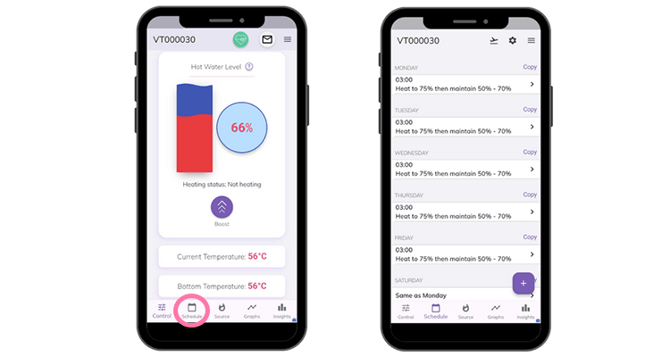
How to set a manual schedule
- Go to 'Schedules' in the main menu (see screenshots)
- Choose your preferred days and times.
-
Set a minimum and maximum level of hot water. This refers to how much hot water is in your tank.
-
If hot water drops below the minimum, the tank automatically reheats.
-
When it reaches the maximum, it will stop heating
-
For Example:
- Weekdays: heat to 80% at 6am
- Evenings: top up to 40% at 6pm
- Weekends: heat to 70% at 8am
When the system won’t follow your manual schedule
Your schedule may appear to be ignored if:
-
Mixergy Flex is still enabled
-
A cleansing cycle is running
-
Frost protection has activated
These behaviours are normal and designed to protect the system or reduce energy use.
Automatic vs manual heat source behaviour
When using Mixergy Flex, the tank uses the Automatic Heat Source setting to decide which heat source to expect during heating.
When using Manual Schedules, the tank follows your schedule but still relies on the selected heat source to actually provide heat.
You can set your schedule to work with different heat sources at different times. To add a different heat source, select Heat Source from the main menu and click on the 'Add Heat Source' button in the bottom right. This will allow you to add an additional heat source and select when it should be used (i.e. set Solar PV to be your primary source during the day).
If the selected heat source cannot deliver heat, the tank will fall back to the immersion heater.
Holiday mode scheduling
Holiday Mode stops your cylinder from heating while you’re away, temporarily ignoring any existing schedules until your return.
To activate Holiday Mode: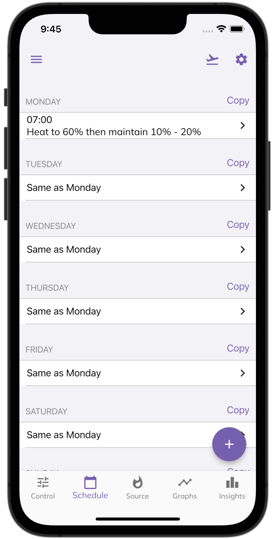
- Go to Schedule in the main menu
- Tap the aeroplane icon at the top of the screen.
- Enter your departure and return dates.
- Confirm your selection, and your cylinder will remain off until the set return date.
This helps save energy and reduce costs while ensuring your tank resumes normal heating when you get back.