
Your Mixergy tank provides the hot water you use at your taps, in your shower and, where fitted, for your bath.
It works differently from a traditional hot water tank. It can heat the amount of water your household needs instead of heating the whole tank every time. This can reduce wasted energy and help lower the cost of heating your water.
You do not need to understand all the controls straight away. This page explains what the tank does, why it may work differently and the simple things you need to know.
This page will help you:
- Understand what your Mixergy tank does.
- See how it is different from a traditional hot water tank.
- Find out how to check and control your hot water.
- Understand how it can help you use less energy.
- Know where to go when you are ready to get started.
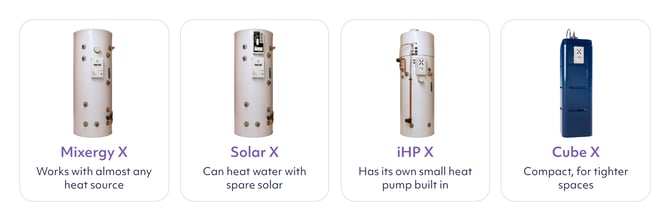
What does your Mixergy tank do?
Your Mixergy tank stores and heats water for everyday use.
It provides hot water for:
- Washing your hands at a hot tap.
- Washing dishes in the sink.
- Taking a shower.
- Running a bath, if you have one.
HOW IT WORKS
Your Mixergy tank provides hot water for your taps, shower and bath.
What is smart hot water?
A traditional hot water tank often heats all the water inside it, even when you only need a small amount.
A Mixergy tank works differently. It heats from the top down and can heat the water in sections. This means it can prepare a smaller amount of usable hot water without waiting for the whole tank to heat.
By heating from the top down, a Mixergy tank can provide usable hot water up to 10 times faster and use up to 40% less energy than a standard hot water tank.
Smart controls help your Mixergy tank work out how much hot water your household is likely to need and when you are likely to need it.
Depending on how your tank is set up, it can use:
- Your usual routine, such as when people normally shower or have a bath.
- A schedule you set in the Mixergy app, telling the tank when you usually need hot water.
- Information about your energy tariff, including times when electricity costs less.
- Spare energy from your solar panels, if you have a compatible solar system.
The tank can then heat the amount of water you are likely to use, ready for when you need it. This can help you:
- Get hot water sooner because the tank does not always need to heat all the water inside.
- Avoid using energy to heat a full tank when you only need a smaller amount.
- Have hot water ready around your household’s usual routine.
- Heat water during cheaper energy periods, where available.
- Use spare solar energy to heat your water, if your system allows this.
- Reduce the amount of energy you use to heat water, which can help keep costs down.
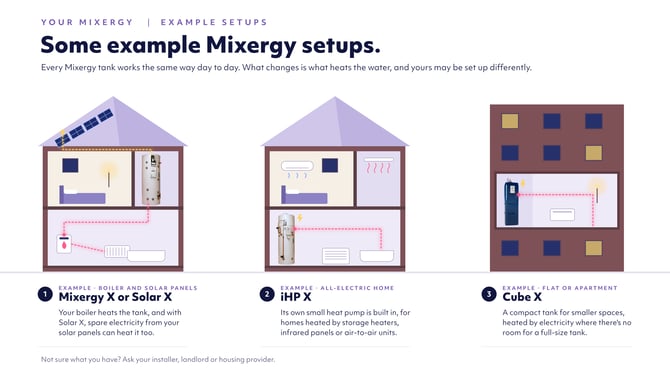
Every home is set up differently. Your Mixergy tank may heat water using electricity, a boiler, a heat pump, solar energy or a combination of these. Some of the smart features described above may not be available with every setup.
Find out how Mixergy saves energy
How do you control your hot water?
Every Mixergy tank has a gauge which simple buttons to heat what you need, or you can use the Mixergy app if your tank is connected to your home's internet.
Use the Mixergy Gauge
The Mixergy Gauge is the slim black panel with lights and buttons on your hot-water tank.
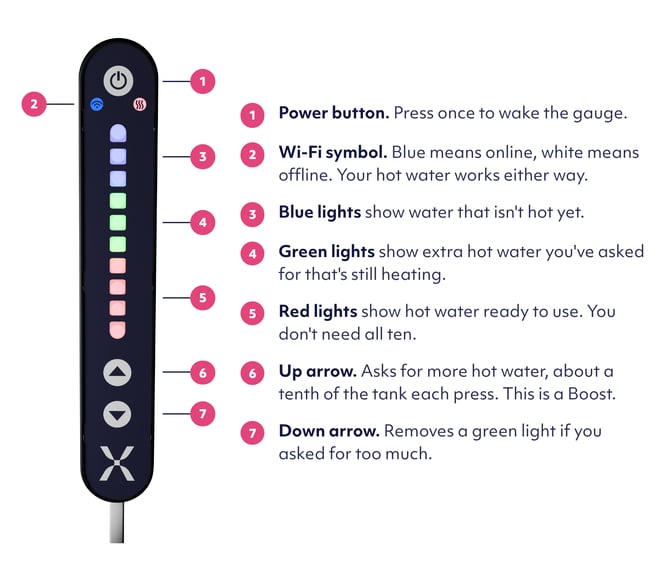
The gauge has a row of ten lights and two arrow buttons.
- The red lights show how much hot water is ready to use. More red lights mean more hot water is ready.
- Press the up arrow when you want the tank to heat more water. This is called a boost.
- Green lights show the amount of extra water you have asked the tank to heat. They turn red as the water heats and becomes ready to use.
- Press the down arrow if you selected more hot water than you need.
You can use the gauge even if you do not have the Mixergy app.
TOP TIP
First, learn how to check how much hot water is ready and how to ask the tank to heat more. You do not need to understand every light and button straight away.
Read “I’ve moved into a home with a Mixergy tank. What do I do?” for step-by-step instructions and pictures.
Learn how to use the Mixergy Gauge
Get more from your tank with the Mixergy app
You do not need the Mixergy app to get hot water. However, if you can use it, the app is the easiest way to get the full benefits of your smart hot water tank.
The app can help you:
- Check how much hot water is ready without going to the tank.
- Boost your hot water wherever you are.
- Set a schedule around your household’s routine.
- Use Mixergy Flex so the tank can learn when you normally need hot water.
- See how much hot water and energy you use.
- Add your energy tariff so the tank can make better use of cheaper energy periods, where available.
These features help the tank prepare hot water around your needs and avoid heating more water than necessary. This can help you save energy and keep costs down.
Set up the app, turn on Mixergy Flex and add your energy tariff to get the best balance of convenient hot water and savings.
If you do not use the app, you can still check your hot-water level and boost it using the Mixergy Gauge.
How can you help keep energy costs down?
Heating only the hot water you need can help you save energy and keep costs down.
To avoid heating more water than you need:
- Check how much hot water is ready before you add a boost.
- Start with a small boost if you are unsure how much you need. You can add more later.
- Use the app to set a schedule around your household’s usual routine.
- Add your energy tariff in the app so the tank can use cheaper energy periods, where available.
- Only heat the whole tank when you expect to need that much hot water.
Every household uses hot water differently. After a short time, you will learn how many lights on the gauge, or what percentage in the app, is usually enough for your home.
If you can use the app, turn on Mixergy Flex and add your energy tariff. This gives the tank the information it needs to balance reliable hot water with energy savings.
What should you do next?
When you are ready to use the controls, read “I’ve moved into a home with a Mixergy tank. What do I do?” It explains how to:
- Check how much hot water is ready.
- Ask the tank to heat more water.
- Understand the red and green lights on the Mixergy Gauge.
- Set up the Mixergy app if you want to use it.
You can also read What to expect in your first 14 days with Mixergy to understand what happens while the tank learns your household’s routine with Mixergy Flex turned on.
Common questions
What does smart hot water mean?
Smart hot water means your tank can heat the amount of water your household needs, rather than heating the whole tank every time. It can also use information about your routine and energy tariff to choose more efficient times to heat.
How can a Mixergy tank help me save energy and money?
It starts heating at the top of the tank, so it can prepare a smaller amount of usable hot water without heating everything inside. This helps avoid wasted energy. If you use the app, schedules and the correct tariff settings can help the tank make better use of cheaper energy periods, where available.
Do I need the Mixergy app?
No. You can check your hot water level and boost the tank using the Mixergy Gauge. However, the app is the best way to use the tank’s smart features, including schedules, energy-use information and tariff settings.
How does the app help me get more from my tank?
The app lets you see how much hot water is ready, boost it remotely and set controls around your routine. Mixergy Flex can learn when your household normally uses hot water and prepare a suitable amount at more efficient times.
Will I still have hot water if I do not use the app?
Yes. The tank can provide hot water without the app. You can use the Mixergy Gauge to check the level and ask the tank to heat more water.
Do I need to change the settings every day?
No. Keep the tank switched on and let it work normally. You only need to use the controls when you want to check the level, ask for more hot water or change your usual routine.
What should I do if I need more hot water?
Press the up arrow on the Mixergy Gauge or select Boost in the Mixergy app. A boost simply asks the tank to heat more water.
Who should I contact if something is wrong?
If you rent your home, contact your landlord or housing provider first. If you own your home, contact your original installer or developer for a New Build home.