![Mixergy Logotype Reversed White-3.png]](https://support.mixergy.co.uk/hs-fs/hubfs/Mixergy%20Logotype%20Reversed%20White-3.png?height=40&name=Mixergy%20Logotype%20Reversed%20White-3.png)
First, check what controller you have
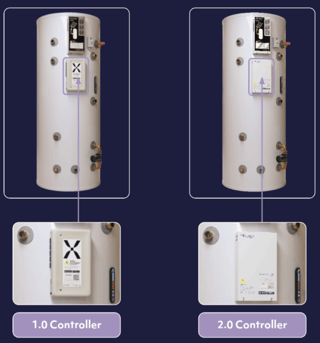
The 1.0 controller is a white box mounted on your tank with a large X logo on the front. The connection label sits on the bottom of the controller.
The 2.0 controller is a plain white box mounted on the front of your tank, marked "mixergy" and "Smart controller". The connection label sits on the bottom right of the controller.
Next establish what connection you have:
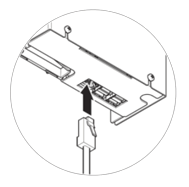
Ethernet connection (1.0 or 2.0 Controller)
If a network cable runs directly from your controller to your router, you have an Ethernet setup.
TP-Link (1.0 Controller)
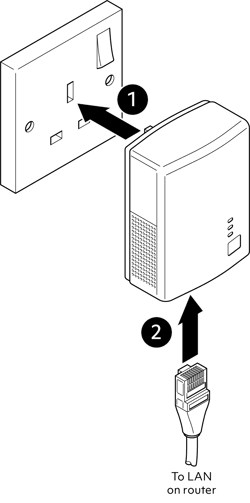
If you have a TP-Link plug in the wall with a cable running to your controller, you have a TP-Link setup.
Wireless (2.0 Controller)
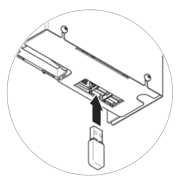
If you have a wireless setup, there will be a USB dongle plugged in bottom of the controller.
Ethernet troubleshooting (1.0 or 2.0 Controllers)
If the tank is offline:
- Confirm the Ethernet cable is securely connected
- Check that the router or switch is powered
- Try a different Ethernet port if available
- Check that the wall plate or access point is active
If you are unsure where the cable routes to, your installer or developer may need to trace the connection.
TP-Link troubleshooting (1.0 Controller)
If the tank is offline, re-pairing may be required before a connection can be re-established, see connect your tank to the internet for more information.
If pairing fails:
- Ensure both adapters are plugged directly into wall sockets
- Try moving the adapters closer temporarily
- Repeat the pairing process
- Avoid extension leads or surge protectors
- If all the above is correct, then please try pairing at least 3 times
If the adapters still do not pair, contact our Homeowners & Resident line.
TP-Link placement best practices
For best performance:
- Plug adapters directly into wall sockets
- Avoid extension leads
- Keep adapters away from heavy electrical interference
- Use sockets on the same electrical circuit where possible
Wireless troubleshooting (2.0 Controller)
First, check the following on your phone:
- Wi-Fi is enabled
- Mobile hotspot is turned off
- VPNs are disconnected during setup
If your phone settings are correct, check the Wi-Fi light on the Gauge on the side of your tank for the following options:
- If the light is white, the tank is ready to connect. Try again.
- If the light is blue, the tank is already connected to the internet (this may be via Ethernet). Close the app fully, log back in and check if your tank appears.
- If the light is any other colour, restart the tank by turning the Gauge off and on, then try again.
- If there's no light, make sure the tank is powered on. See this article to learn more about how to use the Gauge.
If the tank still isn’t connecting after these checks, call our Homeowners & Residents line on 01865 595 875. Hours: Monday to Friday, 09:00 – 17:00.