![Mixergy Logotype Reversed White-3.png]](https://support.mixergy.co.uk/hs-fs/hubfs/Mixergy%20Logotype%20Reversed%20White-3.png?height=40&name=Mixergy%20Logotype%20Reversed%20White-3.png)
After your initial setup, if you are using the Automatic Schedule, your Mixergy hot water tank will begin to build a schedule based on your routine.
If you’d like to make changes or set your own preferences, here are some additional ways to manage your schedule.
Automatic Schedule – Your tank learns your routine and heats water at the most efficient times based on your usage and energy tariff. We recommend this mode for the best balance of convenience and savings.
Manual Schedule – Choose when your tank heats and how much water it heats each time.
How to set an automatic schedule
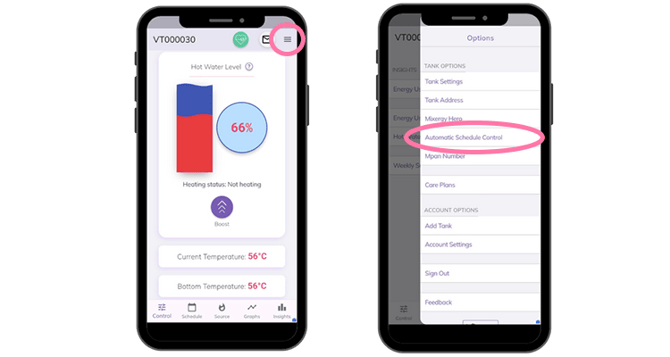
Navigate to ‘Automatic Schedule Control’ using the top right menu and select from the following options:
Standard (with Grid Assistance) – The best all-round option. Saves energy while keeping enough hot water for everyday use.
Economy (with Grid Assistance) – Focuses on maximum savings. this setting is an economy mode which will only heat the minimal amount of hot water, if you think you will use more then we suggest using the Standard schedule.
Grid Assistance Only – You set a manual schedule, but Mixergy may slightly adjust water heating and schedules to help balance the national grid.
Automatic Heat Source – Choose which heating source (electric, boiler, or outdoor heat pump) the tank should use for automatic schedules.
Adjust Target Temperature – Lets Mixergy lower your water temperature slightly when using a boiler or outdoor heat pump to improve efficiency.
Note: Grid Assistance is a built-in feature that helps the UK’s power grid stay balanced by adjusting hot water heating slightly during peak times. Grid Assistance is required to use the Automatic Schedule and runs quietly in the background, you won’t notice any disruption.
How to set a manual schedule
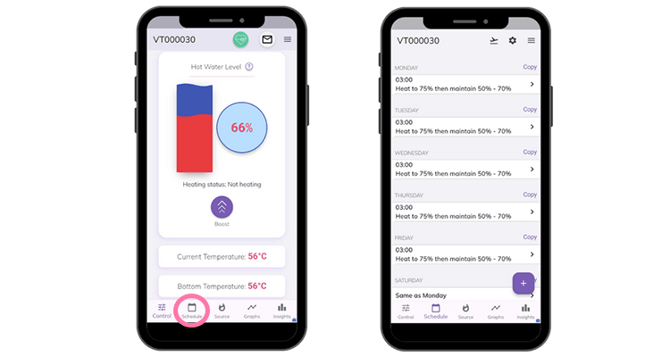
If you prefer a hands-on approach or want to fine tune comfort across the week, you can create a manual schedule that tells your tank exactly when and how much to heat.
1) Choose your preferred days and times.
2) Set a minimum and maximum level of hot water. This refers to how much hot water is in your tank.
- If hot water drops below the minimum, the tank automatically reheats.
- When it reaches the maximum, it will stop heating
For Example:
- Weekdays: heat to 80% at 6am
- Evenings: top up to 40% at 6pm
- Weekends: heat to 70% at 8am
Need more help?
Call our Homeowners & Residents line:
- Phone: 01865 595 875
- Hours: Monday to Friday, 09:00 – 17:00