
If you have changed your broadband, router or Wi-Fi password your tank may need to reconnect to the internet. Start with the check below, then choose the guide that matches your connection.
Your hot water should continue to work while the tank is offline. You can still ask it to heat extra water using the gauge, the slim black panel with lights and buttons on your tank. See How to boost your hot water for help.
1. Is your tank already connected?
Check that your new router is working by opening a webpage on a phone connected to your home Wi-Fi. If it won’t load, contact your broadband provider before trying to reconnect the tank.
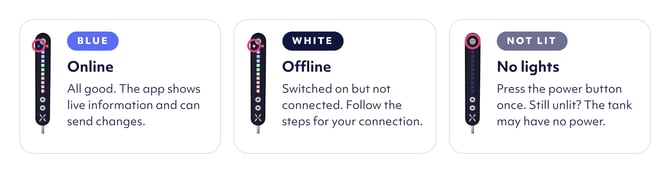
Once the internet is working, allow a few minutes. Look at the small Wi-Fi symbol near the top of the tank’s gauge. It shows the connection status even if your tank uses a cable.
- Blue: the tank is connected. You don’t need to reconnect it. If the app says it is offline, close and reopen the app. If the message remains, see Connection troubleshooting.
- White: the tank is offline. Choose your connection type below.
No light: check that the tank’s normal visible power switch is on. If it is on but the gauge stays unlit, use the help details below.
2. Choose your connection type
Follow only the guide that matches your setup.
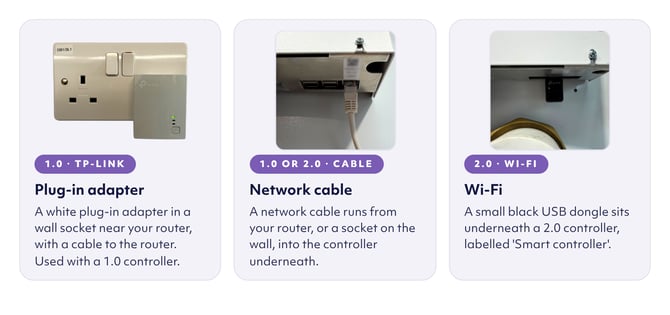 My tank connects through Wi-Fi - 2.0 Controller
For a Mixergy 2.0 controller tank that connects directly to your home Wi-Fi.
Follow Connect a Mixergy 2.0 controller to the internet to enter your new Wi-Fi details.
My tank uses a network cable - 1.0 or 2.0 Controller
For a tank connected directly to the router or a network socket by an Ethernet cable, which has a clear plastic plug at each end.
Follow the network-cable instructions in Connect your tank to the internet.
My tank uses a TP-Link plug-in adapter - 1.0 Controller
For a tank connected through a TP-Link adaptor , usually one near the router with an ethernet cable plugged into the router
Follow Reconnect your Mixergy tank using TP-Link adapters.
I’m not sure how my tank connects
See Find your Mixergy code and controller version for help identifying your setup.
Don’t open the controller box or remove covers. If you still can’t identify the connection, ask your installer, developer, landlord or housing provider.
3. Has the Wi-Fi symbol turned blue?
After following your connection guide, allow a few minutes and check the gauge again.
- Yes: your tank is connected. Reopen the Mixergy app if you use it.
- No: follow Connection troubleshooting or contact the team below.
Common questions
Will changing broadband stop my hot water?
Your hot water should continue to work while the tank is offline. You can use the gauge’s up arrow to ask for extra hot water while the connection is restored.
Do I need to reconnect if the Wi-Fi name and password haven’t changed?
The tank may reconnect automatically. Once the new router has internet access, allow a few minutes and check the gauge. A blue Wi-Fi symbol means it is connected.
Do I need the Mixergy app to reconnect?
Direct Wi-Fi setup uses the app. The network-cable and TP-Link adapter checks do not require it. Follow the guide for your connection type.
How do I know reconnection has worked?
The Wi-Fi symbol on the gauge turns blue. If you use the app, close and reopen it to check the tank’s status.
Should I reset my account after changing the router?
No. A router change needs an internet reconnection, not an account or ownership reset. Follow the connection guide for your setup.