
If your tank is installed and showing as connected in the app but the water isn’t getting hot, the thermostat’s safety cut-out may have tripped. It’s a small switch that turns the heating off to protect the tank, and resetting it takes a couple of minutes.
Before you start
Turn off the power to your tank at the wall switch next to it (the one that feeds the tank) and leave it off while you do the reset. If you can’t find the switch, or you don’t feel comfortable doing this, skip to “Still not heating?” below.
Step 1. Find out which thermostat you have
Take a look at the heater on your tank and match it to one of the three types below:
Solar X with Mixergy solar diverter, red reset button
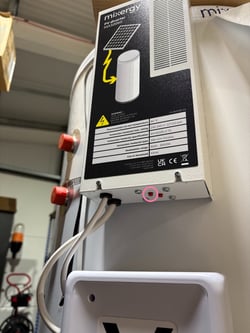
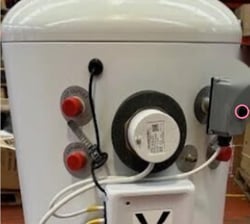
Mixergy X - Standard immersion, black cap
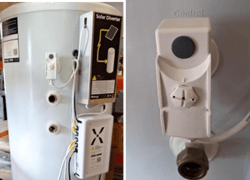
Solar X - Standard immersion, white plastic nut with black centre
Step 2. Reset it
Solar X (with the built-in Mixergy solar diverter)
Press the red reset button firmly.
Mixergy X - Standard immersion with a black cap
Twist the black cap off until you hear or feel a click.
Solar X - Standard immersion with a white plastic nut
Press the small black circle in the centre of the white nut until you hear a click. The tip of a pen or a pin works well for this.
Once you’ve heard the click, turn the power back on at the wall switch.
Step 3. Check your tank is heating
Open the Mixergy app and start a boost, then watch to see whether the hot water level begins to rise. It can take a little while to show, so give it 15 to 20 minutes.
If the level is going up, you’re all sorted!
Still not heating?
If nothing has changed, or the thermostat trips again after you’ve reset it, don’t keep resetting it, as that usually means something needs looking at by an Installer.