
Connecting your tank to the internet allows the Mixergy app to show current information and send changes to the tank. You need a connection for remote control, schedules and other smart features. You can still use hot water when the tank is offline, using the Mixergy Gauge on the front of the tank.
Before you start
Check your home internet is working, for example by loading a website on your phone over Wi-Fi. Then look at the Wi-Fi symbol on your Mixergy Gauge. If it’s blue, your tank is already online and there’s nothing else to do. If it’s white, follow the steps for your connection below.
Check your controller version
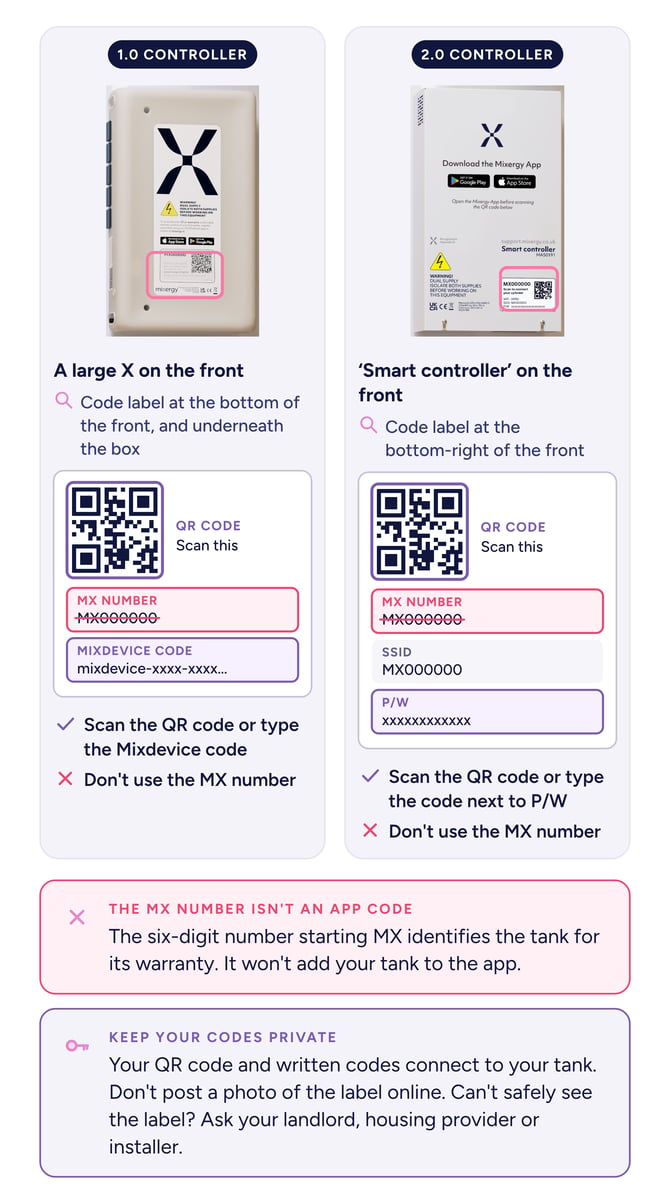
First, check what controller version you have by looking for the box on the Mixergy tank. A 1.0 controller is normally a plastic box with an X label. A 2.0 controller is metal with information printed on it. Use the route that matches your controller.
IMPORTANT
Only use visible sockets, cables, approved adapters and app instructions. Ask an installer to carry out internal electrical or network work.
Check how it's setup to connect
Your Mixergy tank can connect to the internet in one of three ways, depending on its controller and how your home is set up. If you’re not sure which you have, ask your installer, housing provider or developer.
1.0 controller · TP-Link powerline adapter
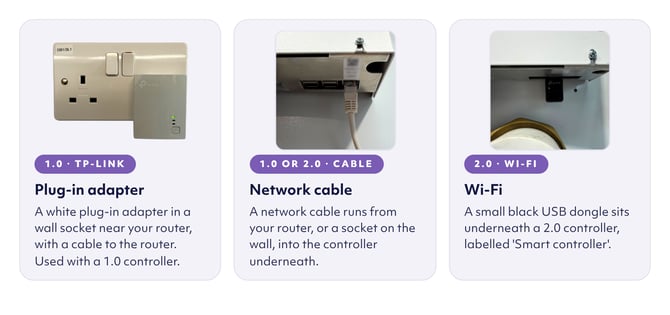
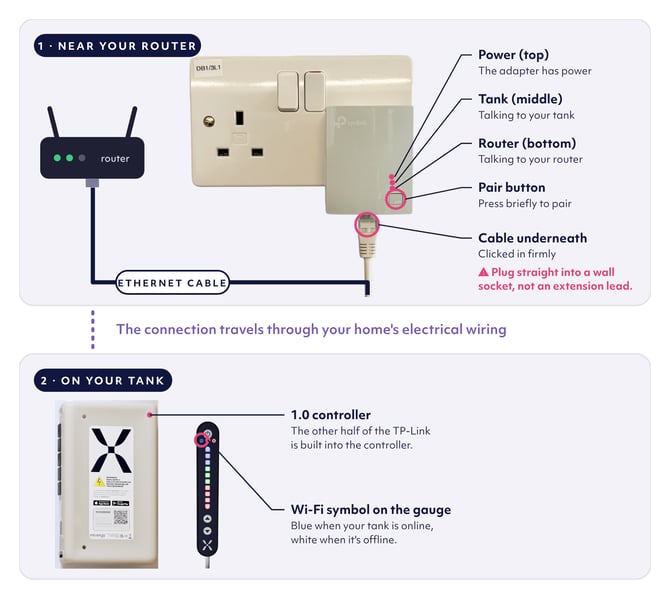
Look for a white adapter plugged into a wall socket near your router, with a cable running to the router. It sends the internet signal through your home’s electrical wiring to your tank, in a similar way to a Wi-Fi extender. If it's not plugged in, the plug may be near your tank and left for you to set up by the installer.
1.0 or 2.0 controller · Network cable
A network cable runs from the controller on your tank to your router. It may go straight to the router, or through your home’s own cabling, for example to a socket on the wall or a network switch in a cupboard.
2.0 controller · Wi-Fi
A small black USB dongle plugged into the controller connects your tank to your Wi-Fi wirelessly.
2.0 controller · Wi-Fi
A 2.0 controller connects to your Wi-Fi through a small black USB dongle plugged in underneath.
- Check the dongle is in place under the controller. If you can’t see one, look for its box, which may have been left in your home, and plug the dongle into the same slot.
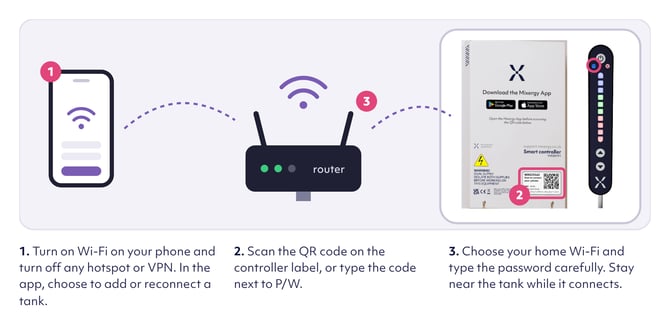
- Turn on Wi-Fi on your phone and turn off any hotspot or VPN.
- In the Mixergy app, choose to add or reconnect a tank.
- Scan the QR code on the controller label, or type in the code next to P/W.
- Choose your home Wi-Fi and type the password carefully. Stay near the tank while it connects.
When the Wi-Fi symbol on the gauge turns blue, your tank is online.
 1.0 or 2.0 controller · Network cable
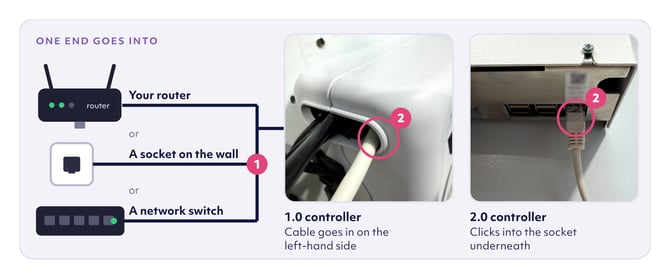
A network cable runs from your home network into the controller on your tank. The other end may go into your router, a socket on the wall or a network switch, and in some homes it runs all the way to the tank.
- Find the other end of the cable and push it in until it clicks.
- 2.0 controller. Push the cable firmly into the socket underneath the controller.
- 1.0 controller. You can only check the router end. The cable goes into the left-hand side of the controller, but please don’t push or pull it there. If you think it’s loose inside, ask your installer, or your landlord or housing provider if you rent.
- Check your internet works on another device, and try another numbered socket on the router.
Give it up to five minutes. A blue Wi-Fi symbol on the gauge means your tank is online.
Have a Solar X? Some Solar X tanks have two network cables coming from a double wall socket, one for your internet and one for the solar diverter. If you’re still not online, follow Tank won’t connect: hardwired Solar X.
1.0 controller · TP-Link adapter
A 1.0 controller is a plastic box with a large X on the front. The TP-Link adapter plugs into a wall socket near your router, with a cable to the router. The other half of the TP-Link is built into the controller on your tank.
- Make sure the adapter is plugged straight into a wall socket, not an extension lead.
- Check the network cable is clicked in at both ends, at the router and underneath the adapter.
- Wait up to five minutes, then check the lights.
All three lights on the adapter and a blue Wi-Fi symbol on the gauge means you’re online. If a light is off or the symbol is still white, you’ll need to pair the adapter with your tank.
Follow Connect or reconnect your Mixergy tank using a TP-Link adapter. Please don’t open the controller to reach a button inside.
Still not online?
Restart your router and wait until your Wi-Fi is working. Press the power button on the gauge once to put the tank on standby. Wait about 20 seconds, then press it again. Give it a few minutes for the symbol to turn blue. Please don’t switch the tank off at the mains unless your installer tells you to.
If it’s still white, contact your landlord or housing provider if you rent, or the installer who fitted your tank if you own your home. Tell them which controller you have, how it connects and the colour of the Wi-Fi symbol.
Common questions
Will hot water stop when the internet drops?
No. Use the gauge to check and boost hot water.
Why should TP-Link adapters use wall sockets?
Extension leads and surge protection can block the powerline signal.
Can I swap network cables in a solar setup?
Only follow a verified property-specific instruction. Similar cables can have different jobs, so ask the installer if unsure.
What if I rent?
Complete only visible checks and contact the housing provider if the connection does not return.