
Your tank can continue heating water if it loses its internet connection. You will not be able to use all the app features while it is offline, but you can still check your hot-water level and ask the tank to heat more using the gauge.
This guide explains how to check whether the tank is offline, what will continue to work and how to reconnect it.
Check whether the tank is offline
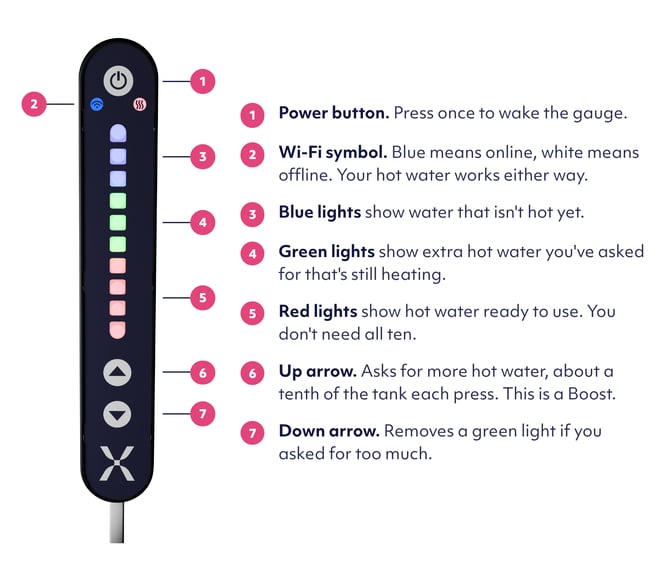
Look at the Wi-Fi symbol on the Mixergy Gauge, which is the slim black panel with lights and buttons on the tank:
- A blue light means the tank is online.
- A white connection light means the tank is offline.
- No connection light, together with no other gauge lights, may mean the tank has no power.
ONE THING TO REMEMBER
Even when the tank is offline, use the red lights to check how much hot water is ready and press the up arrow when you need more.
What you can still do while the tank is offline
- The tank can heat water.
- The gauge can show the hot water level.
- Boost works using the gauge arrows.
- Existing schedules stored by the tank can continue.
- Safety features such as cleansing and frost protection continue while the tank has power.
What needs an internet connection
- The app may show old or missing data.
- App Boost and settings changes cannot reach the tank.
- New schedules and tariff changes will not update.
- The tank cannot be added to a new app account.
- Remote diagnostics and Care Plan reporting may lose data.
How to use hot water while offline
- Check the red lights to see how much hot water is ready.
- Press the up arrow if you need the tank to heat more.
- Watch the green lights. They show the extra amount requested and turn red as the water becomes ready.
Start with a small amount if you are unsure how much you need.
Restore the connection
- Check that your home internet and router are working.
- Check which controller and connection type you have.
- Follow our connection troubleshooting.
Common questions
Will existing schedules disappear?
Existing schedules stored by the tank can continue while it is offline. Any new schedule changes made in the app will not reach the tank until it reconnects.
Can I use the app’s old percentage?
No. The percentage or status shown in the app may be out of date. Use the red lights on the gauge to check how much hot water is ready.
Should I reset ownership?
No. Being offline is an internet connection problem and does not normally require an ownership reset. Follow the connection guide instead.
Should I turn the tank off?
No. Keep the tank switched on so it can heat water, follow any stored schedule and run its safety features.